
Almost every Virtual Assistant or freelancer offers discovery calls—or “disco calls”, as some people call them. You may not call them that, but a call with a prospective client is a key part of most sales processes. Many of us soon get fed up with the email to and fro of “Can you make this time?” or “What about that time?” and choose an online scheduler of one kind or another.
Calendly is one that is often recommended but, like everything else, you need to understand how it works to use it in a GDPR-compliant way.
Is Calendly GDPR compliant?
Calendly has clearly done a lot of work on data protection. It provides a Data Processing Addendum covering how Calendly handles your business’s data. It also provides information about where the data is stored and tools that help its customers deal with requests from people whose information they hold.
Calendly provides the machinery. You still decide what information you collect, why you need it, what you tell people, which extras you switch on, who else receives the information and how long you keep it.
I decided to have a go at setting up Calendly as the data controller for my own business. I expected to add some meeting information and links to our documents, test the booking and be done. I found it surprisingly difficult. It’s not the first time I have had to link my privacy documents and terms to an automated system but this one never offered me any obvious ways to do what I needed to do.
Calendly is very good at telling people about Calendly’s own privacy terms and protecting Calendly’s position. Clear links to the relevant documents appear by default throughout the sign-up, meeting creation, and meeting booking process.
It is much less helpful when you need to show people YOUR privacy information and terms, ask them to confirm that they have read them and make the whole journey work consistently across different meetings.
You need to do this, so that people know what is happening to their information. The default Calendly setup makes it look as though they get the data and you don’t!.
A discovery call creates more data than you might think
At first glance, very little seems to happen. Someone gives you their name and email address, chooses a convenient time and perhaps answers one or two questions about what they want to discuss.
Behind the scenes, Calendly creates an event and may also create or update a Contact. It places information in your connected calendar and sends whatever confirmations, reminders and follow-ups you have set. If you have connected a video-meeting platform, CRM, email-marketing system or automation, copies may travel there too.
If you use an AI note-taking tool, one short discovery call can also produce a recording, transcript, summary and action points.
None of that means Calendly is doing anything sinister. It means that your “simple diary link” is actually collecting and sending personal information—and you are the person who chooses what it asks.
Start with what you ask people
The first thing to look at is the information you ask a prospective client to provide. For most discovery calls, you need their name, email address, chosen time and enough information to understand broadly what they want to discuss. You are unlikely to need their complete client history, financial circumstances or a miniature autobiography before you have even established whether you can help each other.
Open questions can also collect far more than you expected. A coach asking, “What would you like help with?” might receive health or family information. A VA asking a prospect to explain what is going wrong inside their business could receive confidential details about employees, customers or an ongoing dispute.
Ask people not to include confidential or sensitive personal information in their answers to the pre-meeting questions.
It is a small sentence that does a useful job. It sets a boundary at the point where the person is most likely to overshare, instead of leaving you to work out what to do with sensitive information you never wanted to collect.
The ICO’s guidance on collecting only what you need says personal information should be adequate, relevant and limited to what is necessary. In everyday language: collect what you need, but do not turn your scheduler into a full client questionnaire before you know whether this person will become a client.
Our top tip: put the information and links into the booking journey
A privacy link in the footer of your website is not much help if somebody reaches your Calendly page through an email, social-media profile or directory. They need the relevant information where they are actually being asked to provide their details.
It’s also one of many moments when it’s a good idea to provide a link to your standard terms and conditions. The more often people see them and acknowledge them before you send your contract the less people are surprised at the last minute.
If you are a basic or standard level KoffeeKlatch customer it is helpful to create a shareable folder with your data privacy policy and terms document in it. That way if you update the documents you put new versions in the folder and your links are always up to date. If you are at Premium level you can add the documents as HTML pages to your website.
I could not find a place to add this as a default to all calls, but if you know better, please comment on this article and let us know. I ran out of time and patience!
We added the explanation to the Calendly event description itself.
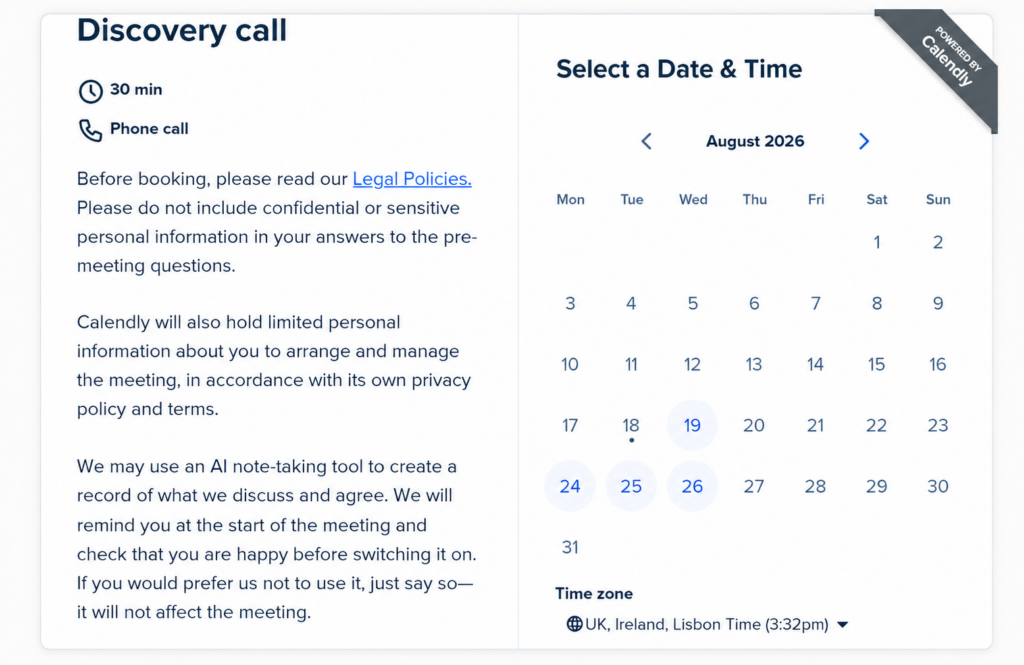
In Calendly, the event description is the place where you can create clickable links. Make sure this information is at the top of your description as your booking page only shows the first few lines. You will need to use wording that reflects your own business. This is the wording that would suit the way we would use Calendly and the information we would collect.
This allows you to turn a URL into a properly named link, so the person sees Data Privacy Policy or Terms and Conditions rather than an ugly string of web characters with no clue where it leads. Calendly’s own guidance on collecting confirmation through custom questions also says the clickable link can go in the event description.
But simply displaying a link does not prove that the person noticed it. Calendly’s setup makes your prospect confirm they have seen your terms, but does not offer an obvious way for you to do the same.
So I used Calendly’s pre-meeting questions to add a required acknowledgement. The person must confirm that they have read the linked information as part of making the booking. Calendly explains how to add a question and make it required in its Help Centre. You will find these under the invitee form by choosing ‘More options’ when editing the event. I chose radio buttons, but you could choose tick boxes or something else and made them compulsory.
Once the booking is completed, Calendly emails both you and the prospect with their answers to the acknowledgement questions and any other questions you have included. This gives you both a dated record of what the prospect confirmed when making the booking. You can keep that email as part of your discovery-call record, for as long as your retention policy says you need it.
They do not appear on the first booking screen shown above. They appear once someone has selected a date and time.
Once the booking is completed, Calendly emails both you and the prospect with their answers to the acknowledgement questions and any other questions you have included. This gives you both a dated record of what the prospect confirmed when making the booking. You can keep that email as part of your discovery-call record, for as long as your retention policy says you need it
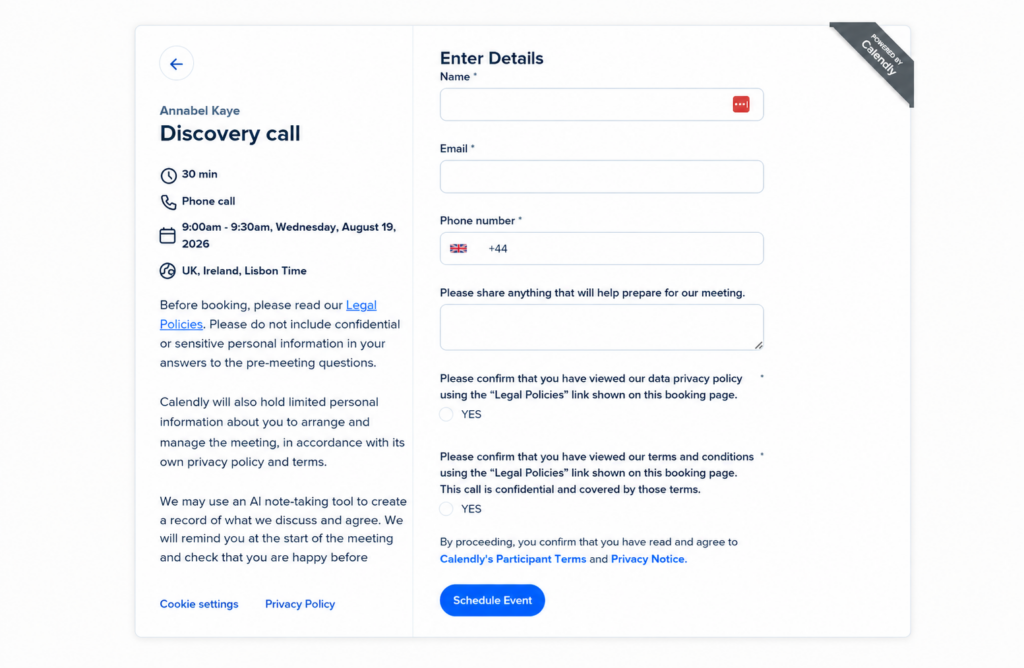
At this stage you are not asking anyone for consent. You are informing them of your data privacy policy and your confidential clauses in your terms and conditions. If you are using KoffeeKlatch terms you have confidential clauses in your terms and you can even refer to a specific set of clauses if you want to. The exact wording is up to you, these are just samples so you can see how it works.
Calendly does not offer one obvious universal place where this wording can be set as the default for every event. But you can duplicate events. Once you have everything set up, you can duplicate the event and change the time or platform while keeping your customised elements. Calendly explains it in its guide to managing event types.
What about AI note-taking?
Calendly now offers its own AI Notetaker, but you may already use another tool such as Fathom or Otter.ai. Whichever tool you use, switching it on can create a recording, transcript, summary and action points containing personal—and sometimes highly sensitive—information.
We have looked at those wider risks in Thinking of using AI transcription tools for client calls? Read this first.
For our Calendly description, we used friendly advance wording rather than dropping a paragraph of legalese into the booking page:
We may use an AI note-taking tool to create a record of what we discuss and agree. We will remind you at the start of the meeting and check that you are happy before switching it on. If you would prefer us not to use it, just let us know.
Calendly says its own Notetaker can send pre-meeting notification emails, post a message in the meeting chat when recording starts and allow an attendee to stop the recording. Those are useful features, but they do not decide whether you should record a particular meeting—or what you should do with the resulting information.
A discovery call may wander into health, family, money, employment problems or confidential client information. Written notes may be perfectly adequate. If you do use an AI notetaker, think about who can see its output, how long it will be kept and whether the person can have the call without it.
That is why our wording promises two things: notice in advance and a further check before the tool is switched on.
Calendly is based in the United States
For the information you collect through the service, Calendly generally handles it on your instructions. In data-protection language, Calendly is usually the processor and your business is the controller.
Calendly says user and invitee information is stored in US data centres operated by Google Cloud and Amazon Web Services. Its data-processing contract includes the standard legal wording used for sending data abroad, including the UK Addendum. Calendly also participates in the UK Extension to the EU-US Data Privacy Framework.
You still need to record that your business uses Calendly, know that information is being sent to the United States and explain this properly in your privacy information. Calendly also publishes a list of the other companies it uses to help provide the service.
Watch what you connect to Calendly
Calendly can connect with calendars, video-meeting services, payment providers, CRMs, marketing systems and automation tools. Each connection can be useful, but it can also create another copy of the prospect or client information.
Automatically adding everybody who books a discovery call to your marketing list is not simply part of arranging the meeting. Make sure you send a sign-up link or a request to your prospects and leave it up to them whether they want to join your newsletter. You can do this as part of your post-meeting thank-you process.
How long does Calendly keep prospect information?
Calendly does not publish one definite default period for keeping invitee and booking information in an active customer’s account. Its Privacy Notice says more generally that it keeps personal data for as long as reasonably necessary for the reason it was collected, its contracts and legal duties, and the time limits for bringing or defending legal claims.
That does not tell your business how long to keep it. You have to decide how long you need the information and then remember to carry out that decision.
There is no universal GDPR rule saying that all prospect data must be deleted after a particular number of months or years. Your ‘data retention’ period depends on why you hold it, what the information contains and how long your genuine sales cycle may be.
At KoffeeKlatch, we keep prospect information for five years because our sales cycle can be exceptionally long, and we review it annually. That is the period we have chosen for our business, not a five-year rule imposed on everybody else.
Customer records may need to be kept for longer because of contracts, tax or possible legal claims. That does not mean Calendly needs to become your permanent customer filing cabinet. Contracts, purchase records and important correspondence can be kept in the systems intended for them. You may also need slightly different messages for customer-only meetings.
The important thing is to choose a period that matches your retention policy. You have a module on that in your Data Privacy Policy mini-course if you are a KoffeeKlatch customer for data privacy policies.
Can you really delete personal data from Calendly?
Calendly does provide self-service data-deletion tools to owners and administrators on all plans, but “delete” does not always mean quite what you might expect.
If you enter a particular invitee’s email address, Calendly says their name will be deleted, their email address and domain will be replaced with an anonymised Calendly address, and their answers to the pre-meeting questions will be deleted. An anonymised event record remains.
Calendly says it processes the request within seven days, after which the deleted information cannot be recovered.
There is also a date-range deletion tool. That sounds ideal for an annual clear-out, but Calendly’s own guidance warns that deleting by date range removes event data only. It does not delete Contacts. Those must be dealt with separately.
Nor will a Calendly deletion remove information already copied into Outlook, Google Calendar, your CRM, email account or meeting platform. Each of those systems needs its own retention process.
Calendly does have an official way for software to automate deletion. However, its developer documentation says this is only available to Enterprise customers. Calendly’s published Enterprise price currently starts at $15,000 a year! So for the rest of us it is semi-manual!
That is a genuine weakness for small businesses. The legal obligation to manage retention applies regardless of size, while the efficient automation is reserved for organisations with an Enterprise budget.
Have you started thinking like a data controller?
If you have never given any of this a moment’s thought, I don’t blame you. Calendly looks like a handy way to organise your diary—not the beginning of a data-mapping exercise.
But once you collect information about prospects and customers, you are the data controller for your business. That does not mean you need to become a data-protection specialist. It does mean learning to look beyond the screen in front of you and ask where the information goes, who else can access it and when you will delete it.
Our GDPR Online Programme helps owner-managed businesses do exactly that, in plain English and with practical support as the tools—and the rules—continue to change.
The practical Calendly check-up
By the time I had finished reviewing our setup, these were the points that mattered:
- Were we asking only for the information needed for the call?
- Could the person see properly named links to our Data Privacy Policy and Terms and Conditions before booking?
- Did the required question obtain the appropriate acknowledgement?
- Had we warned people not to include confidential or sensitive information in their answers?
- Did we explain AI note-taking in advance and promise to check again before switching it on?
- Which connected services received copies of the information?
- How long would we keep unsuccessful prospect data?
- Would our rolling annual deletion routine cover both events and contacts, as well as copies held elsewhere?
- Much of this links back to your Data Privacy Policy, retention decisions, AI Policy, and list of processors and processing activities.
Calendly is very clear that your obligations as a data controller are entirely up to you and they accept no responsibility if you don’t do what is needed to comply.
So, is Calendly GDPR compliant?
I hope by now you have realised that GDPR compliance is not just about finding a supplier’s policies and ticking a box. It is about making sure the people whose data is going into these systems know and understand what is happening with it. It is also about whether you have checked how the information is secured and used (due diligence).
One business can use Calendly in an entirely GDPR-compliant way while another uses it in a non-compliant way.
They don’t make it as easy as they could for you to use it compliantly but you can do it if you take the time when setting it up.
Your compliance depends on what you ask, what you tell people, how you handle acknowledgement, which connections and AI tools you use, and whether you ever clear the information out afterwards.
Calendly can save a great deal of diary admin. Set it up as the data-collection system it really is—not merely as a convenient link—and it can do that job without creating an avoidable data-protection muddle behind the scenes.